
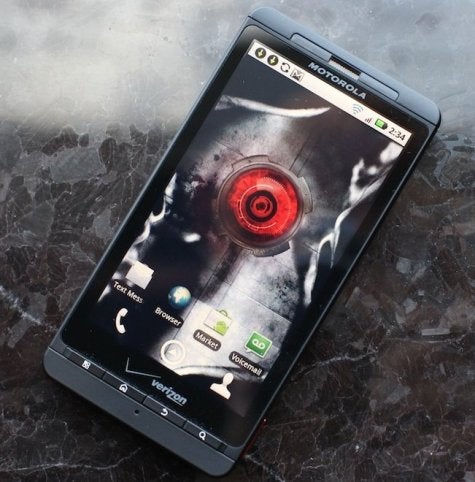
The hotly anticipated follow-up to last year's Droid X, the Motorola Droid X2 ($200 with a two-year contract from Verizon) isn't all that different from the original Droid X, but with two big exceptions: a dual-core processor and a qHD display. This is the first dual-core phone (it runs on an Nvidia Tegra 2 processor) from Verizon, but it unfortunately misses out from the extra boost of Verizon's 4G LTE network; the Droid X2 is only a 3G phone. The X2 excels when it comes to handling video, apps and other productivity features, but the camera isn't great and I wish Motorola would just drop the Motoblur user interface.
Design
Appearance-wise, the Droid X2 looks almost identical to the original. Measuring 5 inches tall by 2.57 inches wide by 0.39 inches thick and weighing 5.46 ounces, the Droid X2 has exactly the same dimensions as its predecessor. The phone is covered in a rubberized black matte material so it isn't prone to fingerprints or scratches (except on the glass display). The phone feels incredibly well-constructed and solid in hand, though it is a big on the large side for those of us with petite hands.
The 4.3-inch display dominates the face of the X2 with the same four thin, rectangular buttons lying below it (the usual Menu, Home, Back and Search) buttons. On the left spine, you'll find both the micro-USB port as well as the HDMI port for connecting your phone to your HDTV. On the right spine, you'll find the volume rocker, which is nicely recessed into the side of the phone. At the top, you'll find the 3.5-mm headphone jack and the power/lock switch.
The X2's 4.3-inch display might be the same size as the original, but this one is a qHD display, which stands for Quarter High Definition. This means the display has a resolution of 960-by-540 pixels arranged in a 16:9 aspect ratio. This resolution is one quarter of a full HD 1080p frame (hence the name) and is three quarters of a 720p frame. The result is crisper details, brighter colors, and better viewing angles.
MotoBlur: Improved, but Not Perfect
Like the Droid X, the X2 runs Android 2.2 with Motoblur. Verizonsays that the phone would be upgraded to Android 2.3 with Gingerbread, but the carrier didn't specify when. The X2's version of Motoblur is a slightly updated version of what comes on the Droid X and other Motorola Droid phones.
When Motoblur first launched on the Motorola Cliq, it was a mess of chaotic bubbles taking over your homescreens with Facebook status updates from high-school friends you no longer speak to and alerts from random RSS feeds. Motoblur has been reduced to homescreen widgets, which you can sync with your social networks.
Some of the things I found annoying about Motoblur have been fixed (like the Gallery, which I'll discuss later in the review), but it still isn't perfect. I don't really find that Motoblur adds much to Android aesthetically or in productivity.
Four widgets are constantly present on your homescreens: Dialer/Contacts, Camera, Text Messaging, All Apps. I couldn't figure out a way to remove or swap out these icons (readers, if you know a way other than rooting, please let me know in the comments, but you can program the Home button to take you to another app (like Music, for example) when you double tap it.
Camera
One nice enhancement between the original and the X2 is the improved camera shutter speed. According to Motorola, the X2's shutter speed is 44% quicker than the Droid X's. There's also a useful Continuous Auto Focus mode, which helps prevent out-of-focus photos.
Other than these improvements, I must again lament Motoblur. The camera interface isn't as intuitive as it is on other Android phones, like HTC's, or the standard Android camera app for that matter. For example, if you want to change the exposure, you can't access the setting from the touch menu when you're in shooting mode. Instead, you have to hit the physical Menu

key, go to Settings, then find Exposure in a long list of other camera settings (including resolution and focus options). I also don't like how you can't touch-to-focus as you can on the iPhone or HTC phones.

Thankfully, Motorola did update the Gallery, which adds some welcome improvements. For example, you can see images from your own library, online libraries (Facebook, Flickr, Photobucket and finally, Picasa!), your friends on various social networks and on DLNA servers.
Overall, the 8-megapixel camera took good pictures. Of course, snapshots taken outdoors looked better than the ones I shot inside. Colors looked bright and natural, but details weren't as sharp as I've seen on other cameras. Indoor photos had a bit of a dark cast to them, but looked pretty good when I had enough lighting. Photos taken in a dark restaurant looked decent, but not as sharp. I tried the LED flash out to see if that would help any, but it completely blew out the colors and the whites of my subject (a fake rose on the table, see image).
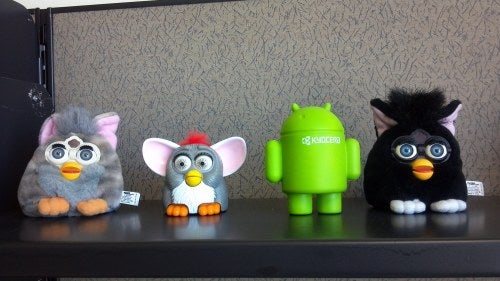
Video capture was dismal. As you can see from the sample clip below, the X2's camcorder had a hard time handling fast-moving action. There was lots of ghosting, blurring and even some crazy distortion when a bunch of cars went by at once. The video clip below pretty much speaks for itself:
In fairness, I also shot some videos of slow-moving objects (a wind-up toy, my coworkers), but I still noticed ghosting and artifacting-though not as pronounced.
Unlike a lot of the high-end phones we've seen, there's no front-facing camera for making video calls. I can't say I'm exactly surprised, however. Video calls over 3G aren't exactly ideal in terms of quality and consistency.
Multimedia/Browser
The Droid X2 is made for watching video and playing games. The dual-core processor helped games run smoothly while the 4.3-inch display showcased colors, details and actions brilliantly. I downloaded somegames with 3D graphics, like Speed Forge 3D, and was impressed with how flawlessly the game ran.
YouTube videos look great when played in HQ (High-Quality) mode. You simply press the HQ button in the corner of the video, and if an HQ version of it exists, you'll be served up a crisper, larger video--one that actually uses the Droid X's entire screen real estate.
The X2 has a new app called Mirror Mode, which lets you view and share your photos, videos, and downloaded movies on a HDTV via the HDMI output. The HDMI cable is unfortunately not included with the Droid X; you'll have to buy it separately.
Other than your usual VCast suite of video and music apps, the Droid X2 comes loaded with other Verizon standbys (bonus apps or bloatware, depending on how you look at it) like NFL Mobile, NFS Shift, Skype, Slacker QuickOffice, and more.
Web browsing on the X2 is fantastic. Pages loaded quickly over 3G, and even faster over Wi-Fi. Scrolling and zooming into text was like silky smooth. Flash 10 videos played superbly as well. There are some nice little tweaks in the browser, like the Bookmarks toolbar, which shows you thumbnail-sized versions of your favorite pages. Page history is clustered into groups that can be opened and viewed in the same manner.
Performance
As I mentioned above, the dual-core processor really shines in video, Web browsing, and gaming. For some reason, on my test phone, the Verizon apps crashed quite frequently. The VCast video app kept telling me that I wasn't connected to the network; it would then insist that it needed to update and take me to the Android Market-and then immediately crash. Argh. The MyVerizon app wouldn't open the first few times I used it either, but it eventually decided to work. One other strange thing was that a 30-second clip, uploaded from YouTube over Wi-Fi, took numerous attempts to upload.
Call quality over Verizon's 3G network in San Francisco was very good. My callers sounded clear and natural with an ample amount of volume. Overall, my friends were very pleased with how my voice sounded over the network.
I haven't had a chance to formally test the X2, but I was impressed with how the battery held up after a full day and a half of testing. I only needed to plug it in at the very end of my testing.
Bottom Line
If you're holding out for the ultimate Verizon phone--one with a dual-core processor and LTE 4G speeds-- you might want to go with the Motorola Droid Bionic, which has been hotly anticipated since CES in January. But if you don't have 4G coverage in your area, or you don't want to pay a premium to use 4G, you'll be happy with the Droid X. Gamers, in particular will appreciate the large, high resolution display combined with the power of a dual-core processor. If you plan on shooting HD videos you're your phone, go with an HTC or Samsung phone-heck, even the iPhone 4. Video capture is probably the worst we've seen from a high-end smartphone.


No comments:
Post a Comment